


How to Choose the Best Alumni Management Software for Your Organization (2026 Guide)

Tasnova Chowdhury
Tasnova Chowdhury is a Business Analyst & Content Writer at Technext and Product Marketer for Gradnet, with 3+ years of content writing experience and a background in Computer Science and Engineering. Drawing from her research into alumni engagement, fundraising, and membership retention, she writes practical guides on alumni events, mentorship programs, and community platforms for educational institutions.
Choosing alumni management software shouldn’t feel overwhelming, but it often does. You’re committing significant budget, migrating years of data, training your team, and hoping this alumni engagement platform will still make sense three years from now.
Here’s the reality: 87% of organizations that rush into alumni software selection without a clear process end up switching platforms within two years or watching their expensive system collect dust while management returns to spreadsheets.
The good news? Organizations that take a structured approach to choosing alumni management software report 180-300% increases in engagement and 2-5x ROI on donations.
This guide walks you through exactly how to choose the best alumni management software that your admins will actually use, your alumni will engage with, and your leadership will approve.
This is a comprehensive, in-depth guide designed to walk you through every step of choosing alumni management software.
We’ve covered everything from assembling your team to negotiating contracts in a 8 step guide. Feel free to use the table of contents to jump to sections most relevant to your needs, or read through completely for the full picture.
Grab a coffee—this one’s detailed!
Key Takeway
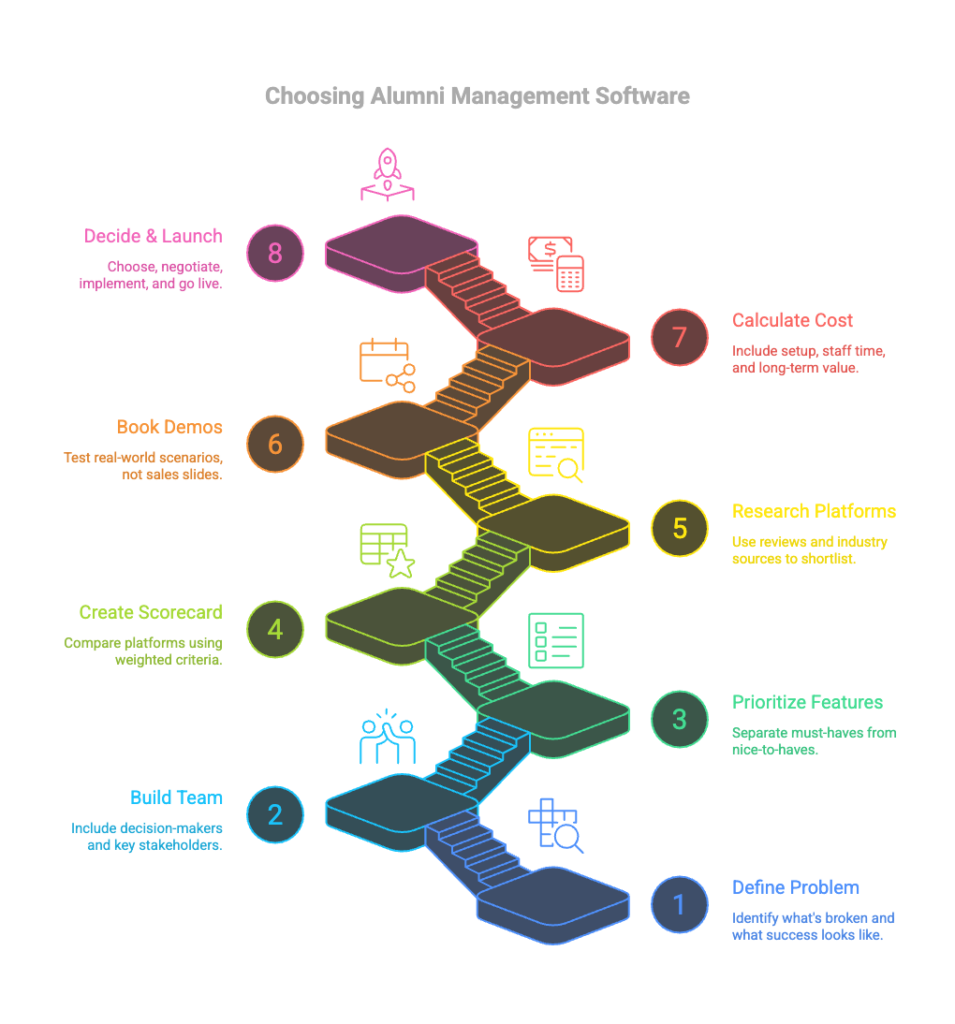
Your 8-Step Checklist to Choosing Alumni Software
✅ Step 1: Identify your core problem—what things would transform your alumni engagement?
✅ Step 2: Assemble a selection team (2-3 decision makers, 3-5 evaluators) and plan 8-12 weeks
✅ Step 3: Define must-haves vs nice-to-haves using the MoSCoW method
✅ Step 4: Create weighted evaluation criteria (functionality, usability, technical, support, cost)
✅ Step 5: Research and shortlist 3-5 platforms that meet all must-haves
✅ Step 6: Request demos with specific scenarios relevant to YOUR organization
✅ Step 7: Calculate true total cost (include hidden fees)
✅ Step 8: Run 14-30 day trials with real data before making final decision
Step 1: Before You Start – Know What You’re Really Solving
Most organizations start their software search backwards. They browse features, book demos, and three months later realize the platform they chose doesn’t actually solve their biggest problem.
Start here instead: What is the one thing that, if it worked better, would transform your alumni engagement?
| Universities & Colleges | Nonprofits | Diaspora Communities |
| Alumni data scattered across multiple spreadsheets and outdated systems | Volunteer-run operations overwhelmed by administrative tasks | Members spread across multiple countries and time zones |
| Event registration needing multiple tools and manual data entry | No clear visibility into member engagement | Language and cultural differences affecting engagement |
| No way to track engaged vs. disengaged alumni | Difficulty demonstrating impact to boards and funders | Managing membership fees across currencies and payment systems |
| Fundraising campaigns with little insight or targeting | Outdated communication tools | Organizing both virtual and in-person regional events |
| Graduates lose contact after graduation until donation time | Members questioning the value they receive | Building genuine community without frequent face-to-face interaction |
Document Your Current State
Before looking at any platform, honestly assess where you are now:
What’s working? Maybe your email open rates are solid, or your annual reunion always sells out. Identify what you want to preserve or amplify.
What’s broken? Be specific. “Engagement is low” isn’t helpful. “Only 12% of alumni under 35 open our emails” gives you something concrete to solve.
What’s missing entirely? Career services? Mentorship matching? Online voting? Regional chapters? Make a list of gaps you can’t fill with current tools.
What does success look like in 12 months? Set measurable goals. “Better engagement” won’t cut it. “30% of recent graduates using the job board within 6 months” gives you a target.
Align on Budget Reality Early
Nothing kills momentum faster than falling in love with a platform you can’t afford. Have honest conversations about budget before you start researching.
Most alumni management platforms fall into these ranges:
- Budget-friendly: $29-$200/month (Join It, Wild Apricot, Gradnet)
- Mid-range: $500-$2,000/month or custom quotes (Gradnet, ToucanTech, 360Alumni)
- Enterprise: $3,000-$10,000+/month (Gradnet, Almabase, Hivebrite, EverTrue)
Remember to budget for:
- Annual platform fees
- Implementation and data migration costs
- Staff training time
- Ongoing support and maintenance
- Potential integration costs
Step 2: Assemble Your Selection Team (Yes, You Need One)
Here’s a mistake organizations make constantly: having one person (usually someone already drowning in work) research platforms alone, then presenting a recommendation to leadership who haven’t been involved in the process.
This ends predictably. Either leadership rejects the recommendation because they don’t understand the reasoning, or they approve it and then everyone complains the platform doesn’t meet their needs. Comparison Chart of the Best Marketing Project Management Software
|
Role Type |
Universities & Colleges |
Nonprofits |
Communities |
|
Decision Makers |
|
|
|
|
Core Evaluation Team |
|
|
|
|
Input Providers |
|
|
|
Establish Clear Roles
Project Lead: One person coordinates the process, schedules meetings, compiles feedback, and keeps things moving. This cannot be “whoever has time.”
Technical Evaluator: Someone assesses security, integrations, data migration requirements, and technical feasibility.
User Experience Champion: Someone evaluates ease of use for both staff and alumni, ideally by having alumni actually test the platform.
Financial Analyst: Someone calculates true total cost of ownership, not just the sticker price.
Set Timeline Expectations
A thorough alumni software selection typically takes 8-12 weeks:
- Week 1-2: Internal assessment and requirements gathering
- Week 3-4: Research and shortlist creation
- Week 5-7: Demos and Q&A with vendors
- Week 8-10: Trial periods with top 2-3 platforms
- Week 11-12: Final decision and contract negotiation
Yes, that feels long. But rushing this decision costs way more in the long run when you realize six months in that the platform can’t do what you need.
Step 3: Define Your Must-Have Features vs. Nice-to-Haves
Here’s where most organizations go wrong: they create a wishlist of 47 features, treat everything as equally important, and then get paralyzed when no platform checks every box.
Use the MoSCoW method instead: Must have, Should have, Could have, Won’t have (this time).
Must-Have Features (Non-Negotiable)
These are the features without which the platform is automatically disqualified. For most alumni organizations, must-haves typically include:
Core Database Management
- Centralized alumni database with custom fields for your needs
- Ability to import existing data without losing information
- Search and filter capabilities that actually work
- Data security and privacy compliance (GDPR, CCPA if applicable)
Event Management
- Event registration and ticketing
- Payment processing capabilities
- Attendee tracking and check-in tools
User Experience
- Mobile-responsive design (not necessarily a dedicated app)
- Reasonable learning curve for staff
- Intuitive interface for alumni who won’t read instructions
Communication Tools
- Email campaigns with segmentation capabilities
- Newsfeed where members can post and connect
Should-Have Features (Important but Flexible)
These features significantly improve your experience but aren’t dealbreakers:
- Alumni directory with privacy controls
- Fundraising and donation tracking
- Member portal for alumni self-service
- Integration with your existing CRM or database
- Reporting and analytics dashboards
- Multi-language support (if serving a global community)
- Payment gateway supporting your needed currencies and methods
- Job board and career services
- Mentorship and mentee options
Could-Have Features (Nice Bonuses)
These add value but you can live without them:
- Discussion forums or social features
- Chapter or affinity group management
- Online voting for elections
- Custom mobile app
- Advanced AI features or automation
- Video hosting or webinar integration
Won’t-Have Features (Not This Time)
Be honest about features you don’t need right now. Maybe AI-powered donor prediction sounds cool, but if you have 300 alumni total, you don’t need machine learning to know who might donate.
Common features organizations think they need but often don’t:
- Elaborate social networking features (LinkedIn exists)
- For promotion, marketing, and sharing important information quickly (Facebook exists)
- Complex gamification (rarely drives sustained engagement)
- Every possible integration (start with your top 2-3 tools)
- Custom mobile app (mobile-responsive website usually sufficient)
Document this prioritization in writing. When you’re six demos deep and a sales rep is showing you a shiny feature you hadn’t considered, you can check: is this a must-have, should-have, or just noise?
Step 4: Create Your Alumni Software Evaluation Criteria
Now that you know what features matter, create a scoring system so you can objectively compare platforms instead of going with whichever sales demo had the best energy.
Sample Evaluation Scorecard
Create a spreadsheet with vendors across the top and criteria down the left. Score each on a scale of 1-10, then multiply by the weight to get weighted scores.
Core Functionality (Weight: 30%)
- Database management capabilities
- Communication tools effectiveness
- Event management features
- Payment processing options
Usability (Weight: 25%)
- Staff learning curve
- Alumni user experience
- Mobile accessibility
- Admin interface intuitiveness
Technical Considerations (Weight: 20%)
- Data security and compliance
- Integration capabilities
- Reliability and uptime
- Data migration process
Support and Growth (Weight: 15%)
- Customer support quality and availability
- Training resources and documentation
- Platform updates and roadmap
- Scalability for future growth
Cost (Weight: 10%)
- Transparent pricing structure
- Total cost of ownership
- Value for features provided
- Hidden fees or upsells
Note: Adjust these weights based on what matters most to your organization. If budget is extremely tight, increase the cost weight. If you’re serving global alumni, bump up technical considerations for multi-language and currency support.
Objective vs. Subjective Scoring
Some criteria are objective:
- Can it process international payments? (Yes/No)
- What’s the customer support availability? (24/7, business hours, email only)
Others are subjective:
- How intuitive is the interface? (Your opinion)
- How responsive is customer support? (Your experience)
- How well does it align with your workflow? (Your context)
For subjective criteria, have multiple people score independently, then average the results to reduce individual bias.
Step 5: Research and Shortlist Platforms
Now you’re ready to start researching actual platforms.
Your goal: create a shortlist of 3-5 platforms worth demoing. Not 12. Not 2. Three to five.
Where to Research
Start with targeted searches:
- “Alumni management software for [your type of organization]”
- “Best alumni engagement platforms 2026”
- Industry-specific resources and associations
Check review sites:
- G2 (filter by organization size and industry)
- Capterra
- Software Advice
- TrustRadius
Read comparison articles: Like the 10 Best Alumni Management Software in 2026 guide, which breaks down platforms by use case and features.
Ask your network:
- What do similar organizations use?
- What do they wish they had chosen instead?
- What surprised them after implementation?
Red Flags During Research
Watch out for these warning signs:.
No trial or demo available– Confident platforms let you test before buying. If they won’t let you see the product without a sales call, that’s a red flag.
Feature list sounds too good to be true– If a platform claims to do everything perfectly for everyone at an unbelievably low price, it probably does many things poorly.
Negative reviews mention the same issues repeatedly– One bad review is an outlier. Ten reviews mentioning terrible customer support is a pattern.
Platform hasn’t been updated in years– Check their blog, release notes, or social media. Active development matters for security and functionality.
Create Your Shortlist
Based on your research, narrow down to 3-5 platforms that:
- Meet all your must-have requirements
- Fall within your realistic budget range
- Have positive reviews from similar organizations
- Offer demos or trials
- Show active development and support
Document why each platform made the shortlist. This helps when you need to explain your reasoning to leadership or board members later.
Step 6: Request Demos and Ask the Right Questions
Demo calls are where vendors try to sell you. Your job: cut through the sales pitch and get real information about whether this platform actually fits your needs.
How to Structure Demo Requests
When reaching out to vendors, provide context:
“We’re a [type of organization] with [X] alumni members looking for [primary goal]. Our timeline is [X weeks] for decision-making. We’re particularly interested in seeing [specific features]. Can you show us how your platform handles [specific use case relevant to you]?”
This sets expectations and helps them prepare a relevant demo instead of their standard 60-slide pitch deck.
Questions to Ask Every Vendor
About the Platform:
- How long have you been in business, serving organizations like ours?
- How many active clients do you have in our industry/sector?
- How often do you release updates or new features?
- What’s on your product roadmap for the next 12 months?
About Implementation:
- What does the typical implementation timeline look like?
- What’s involved in data migration from our current system?
- What format do you need our existing data in?
- How much of the setup can we do ourselves vs. requiring your support?
- What training and onboarding do you provide for our staff?
About Support:
- What are your customer support hours and channels?
- What’s your average response time for support tickets?
- Do you charge extra for support, or is it included?
- Is there a dedicated account manager or relationship owner?
- What happens if we encounter a critical issue outside business hours?
About Data and Security:
- Where is our data hosted, and who owns it?
- How is data backed up, and how often?
- What security certifications do you have (SOC 2, ISO 27001, etc.)?
- Can we export all our data if we ever decide to leave?
- How do you handle GDPR/CCPA compliance?
About Cost:
- What’s included in the base price, and what costs extra?
- Are there limits on contacts, emails sent, or storage?
- What happens when we exceed those limits?
- Are there setup fees, migration fees, or training fees?
- How does pricing change as we grow?
- What’s the contract length, and what are cancellation terms?
The Most Important Question
After they’ve shown you all the features, ask this:
“What are the top 3 reasons clients in our situation decide NOT to choose your platform?”
Good vendors will give you honest answers about fit. Bad vendors will deflect or claim everyone loves them. This question reveals a lot about whether they’re focused on solving your problem or just closing a sale.
Request Specific Scenarios
Don’t just watch their canned demo. Ask them to show you:
“Walk me through creating an event registration form with tiered ticket pricing and early bird discounts.”
“Show me what the interface looks like for an alumnus who wants to update their profile and RSVP to an event.”
“How can anyone participate in any fundraising?”
“What privacy settings my members get”
Real-time navigation shows you how intuitive (or clunky) the platform actually is.
Step 7: Calculate True Total Cost of Ownership
That $500/month platform might actually cost you $12,000 in year one. And that $2,000/month platform might cost $25,000. Here’s how to calculate what you’re actually spending.
Components of Total Cost
Year 1 Costs:
Platform Fees
- Monthly or annual subscription fee
- Setup or onboarding fees
- Data migration fees
- Initial training costs
Implementation Costs
- Staff time for setup and configuration (estimate hours × hourly rate)
- Any custom development or integration work
- External consultant fees if needed
Transition Costs
- Time spent migrating from old system
- Overlap period where you’re paying for both old and new systems
- Communication costs telling alumni about the new platform
Ongoing Annual Costs:
Platform Fees
- Annual subscription (calculate any increases)
- Per-user fees if applicable
- Storage or contact overage fees
- Additional module costs
Maintenance
- Staff time for platform administration
- Regular training for new staff members
- Updates to integrations as systems change
Hidden Costs
- Payment processing fees (usually 2-3% per transaction)
- SMS fees if using text communications
- Premium support fees
- Add-on features you realize you need
Step 8: Make Your Final Decision
You’ve researched, demoed, tested, and analyzed. Now it’s decision time.
Compile Your Findings
Create a final comparison document that includes:
Scorecard Results: Your weighted evaluation scores for each platform
Trial Feedback: Summary of what your team experienced during testing
Cost Comparison: True total cost of ownership for year 1 and years 2-3
Research Insights: Key takeaways from research conversations
Gut Check: Honest assessment from each core team member
Present to Decision Makers
When presenting your recommendation to leadership or board members, lead with:
- The Problem: Remind them what you set out to solve
- The Process: Briefly explain your evaluation methodology
- The Finalists: Why these 2-3 platforms rose to the top
- The Recommendation: Your top choice and why
- The Backup: Your second choice if the first doesn’t work out
- The Timeline: Implementation plan and key milestones
Anticipate common questions:
- “Why not the cheapest option?”
- “Why not the one with the most features?”
- “Can we negotiate a better price?”
- “What if this doesn’t work out?”
Have clear, data-backed answers ready.
Negotiating the Contract
Most alumni software vendors are willing to negotiate, especially on:
Contract Length: They want multi-year commitments. You want flexibility. Meet in the middle with a one-year contract with option to extend, or a two-year contract with out clause after year one.
Pricing:
- Ask if they can waive setup fees
- Request discounts for annual vs. monthly payment
- See if they’ll include additional training sessions
- Ask about nonprofit discounts if applicable
Terms:
- Negotiate data ownership and export rights explicitly
- Clarify what happens if you want to cancel
- Get uptime guarantees and remedies in writing
- Specify support response time SLAs
Don’t negotiate yourself into a bad deal: The absolute cheapest price isn’t worth it if the platform doesn’t meet your needs. Focus on fair value, not rock-bottom cost.
Plan Your Implementation
Before you sign, create a high-level implementation timeline:
Weeks 1-2: Setup and Configuration
- Platform setup and branding
- Admin user creation and permissions
- Initial configuration decisions
Weeks 3-4: Data Migration
- Export data from current systems
- Clean and format data
- Import and verify in new platform
Weeks 5-6: Testing and Training
- Staff training sessions
- Test key workflows
- Create documentation and resources
Weeks 7-8: Soft Launch
- Launch to small group of engaged alumni
- Gather feedback and fix issues
- Refine processes
Week 9+: Full Launch
- Communicate with all alumni
- Full team using platform
- Monitor adoption and engagement
Common Mistakes to Avoid
Learn from others’ mistakes:
Choosing Based on Sales Charisma The most charming sales rep doesn’t mean the best platform. Stick to your evaluation criteria.
Feature Creeping During Evaluation Every demo will show you features you hadn’t considered. Don’t constantly add new requirements, or you’ll never decide.
Skipping the Trial “We don’t have time to test” always costs more time when you choose the wrong platform.
Ignoring User Experience A platform packed with features nobody can figure out how to use helps nobody.
Forgetting About Your Alumni You’re not the primary user. Your alumni are. Choose a platform they’ll actually engage with.
Underestimating Implementation Time Whatever timeline they quote, add 50%. Seriously.
Not Planning for Training The platform is only as good as your team’s ability to use it. Budget time and resources for proper training.
Final Thoughts: Trust the Process
Choosing alumni management software feels overwhelming because it is. You’re making a significant investment with long-term implications for your organization.
But here’s what I’ve learned after helping dozens of organizations through this process: the organizations that succeed aren’t necessarily the ones who pick the “best” platform. They’re the ones who pick the right platform for their specific situation and then commit to making it work.
Perfect doesn’t exist. Every platform has trade-offs. The key is finding the one where the trade-offs you’re making are trade-offs you can live with.
If you follow the process in this guide—being honest about your needs, involving the right people, testing thoroughly, and thinking long-term—you’ll make a decision you can be confident in.
And when someone on your board inevitably asks six months from now, “Why did we choose this platform again?” you’ll have clear documentation showing exactly why it was the right call for your organization at that time.
That’s worth more than any fancy feature or slick demo.
Ready to Start Your Search?
If you’re looking for an all-in-one alumni management platform that delivers proven results, Gradnet offers comprehensive features for universities, nonprofits, and diaspora communities. With a track record of helping organizations raise $2M+ in donations and achieve 180-300% increases in engagement, Gradnet provides the career services, event management, fundraising tools, and community features you need—all in one secure platform.
Book a free demo with Gradnet to see how it fits your specific needs-
Good luck with your selection—you’ve got this!
A Smarter Way to Build Community
Gradnet centralizes everything—members, events, and fundraising—so your community can grow effortlessly.